
Most email services won't let you attach anything bigger than 20–25 MB. For videos, photo sets, design files or a folder of documents, the simplest fix is free temporary file storage: upload the files once, send a link, and let the files delete themselves automatically. This guide shows how to do it with FlyFiles, with up to 500 MB per room, no signup, an optional 6-digit PIN, and automatic deletion after 12 hours.
Quick answer:
- Open FlyFiles.io and drop your files (up to 500 MB).
- Optional: set a 6-digit PIN in the room settings.
- Copy the room link and paste it into your email.
- The files are permanently deleted after 12 hours, or earlier if you delete them yourself.

#Email attachment size limits by provider
Before you reach for a file-sharing link, check whether the file fits. These are the usual limits for free personal accounts:
| Email provider | Max attachment size (free account) | What happens with bigger files |
|---|---|---|
| Gmail (@gmail.com) | 25 MB | Gmail offers a Google Drive link instead |
| Outlook.com / Hotmail (@outlook.com, @hotmail.com, @live.com) | 20 MB | Outlook offers to upload to OneDrive and share a link |
| Yahoo Mail (@yahoo.com) | 25 MB | Yahoo can share via Google Drive or Dropbox |
| iCloud Mail (@icloud.com, @me.com) | 20 MB | Mail Drop in Apple Mail sends up to 5 GB as a link (expires after 30 days) |
| Proton Mail (@proton.me) | 25 MB | Use Proton Drive sharing |
| GMX (@gmx.com, @gmx.de) | 50 MB | GMX Cloud link |
| mail.com | 30 MB | mail.com Cloud link (Premium: 100 MB attachments) |
| Inbox.lt / Inbox.lv (@inbox.lt, @inbox.lv) | 50 MB | Inbox Files link |
Important details:
- Attachments grow by about 33% when sent. Email encodes files as text (Base64), so a "25 MB" limit really means about 18–19 MB of actual files.
- The recipient's limit matters too. A 45 MB email from GMX or Inbox.lt can still bounce if the recipient's server accepts less. Many company mail servers accept only 10–25 MB.
- Work and school accounts (Microsoft 365, Google Workspace) may have different limits set by your IT admin.
Rule of thumb: for anything above 15–20 MB, send a link instead of an attachment.
#What is temporary file storage?
Temporary file storage (sometimes called "ephemeral file sharing") means your files live on a server only for a limited time, just long enough for someone to download them. Then they are deleted automatically.
Compared with Google Drive, OneDrive or Dropbox, temporary storage has clear advantages for one-off transfers:
- No account for you or the recipient. You don't need sign-in, invitations or "request access".
- Nothing to clean up later. Permanent cloud drives fill up with old shared files you forgot about.
- Smaller privacy risk. A link that works for 12 hours can't leak your files a year from now.
- Nothing synced to your devices, so it works fine on a borrowed or work computer.
#How FlyFiles temporary storage works
#Free: up to 500 MB, 250 files, 12 hours
Every FlyFiles room is free and needs no signup:
- Up to 500 MB in total per room.
- Up to 250 files, including whole folders.
- 12 hours of availability, with a countdown visible in the room.

The timer starts when the room is created, and everyone who opens the link sees the same countdown. That way the recipient knows exactly how long they have to download.
#Deleted means deleted: files are never restored
When the timer hits zero, an automatic cleanup job runs every minute and:
- Erases the files from the server's storage. The file data is physically removed, not just hidden.
- Removes the file records from the database, so the old link shows "This room has expired and files are no longer accessible."
- Closes the room for good. There is no trash bin, no "restore" button and no backup to recover from.
This is deliberate: temporary storage is only private if it is really temporary. It also means you should always keep your own copy of anything important. FlyFiles is for transferring files, not for backup.
#You control access: delete files any time
You don't have to wait for the 12 hours to run out. In your room, click the trash icon next to a file to delete it immediately, or use Delete all to empty the room. The confirmation tells you it's final:

So you decide how long your files are accessible. Once the recipient has downloaded them, delete the files and the link stops working right away.
#How to protect your files with a PIN
Anyone with the room link can open it, so for personal or business documents add a 6-digit PIN:
- In your room, click the ⚙ Settings icon.
- Under Room PIN, enter six digits. The PIN is saved automatically.
- Visitors now need the PIN before they can see or download any files.

You can also turn off Allow others to upload files in the same settings, so the room becomes download-only for everyone except you.
Security tips:
- Send the PIN through a different channel than the link, such as SMS, WhatsApp or a phone call. If the email is forwarded or intercepted, the files stay locked.
- Don't reuse PINs you use for your bank card or phone.
- Delete the files once they're downloaded. The safest file is one that no longer exists.
#How to send large files by email (step by step)
#1. Upload your files
Open flyfiles.io and drag your files or a folder into the upload area. On a phone, tap Select Files or scan the QR code with another device to upload from there.
#2. Copy the shareable link
Below the file list, click Copy next to the shareable link.

#3. Write the email
Open Gmail, Outlook or any email app and paste the link into a new message. A good large-file email includes:
- A clear subject with what the files are and how big they are, e.g. "Wedding photos (450 MB) – download link".
- The link on its own line, so it's easy to click.
- The deadline. Say when the link stops working (12 hours after upload), so the recipient downloads in time.
- How they'll get the PIN, if you set one. Never put the PIN in the same email.
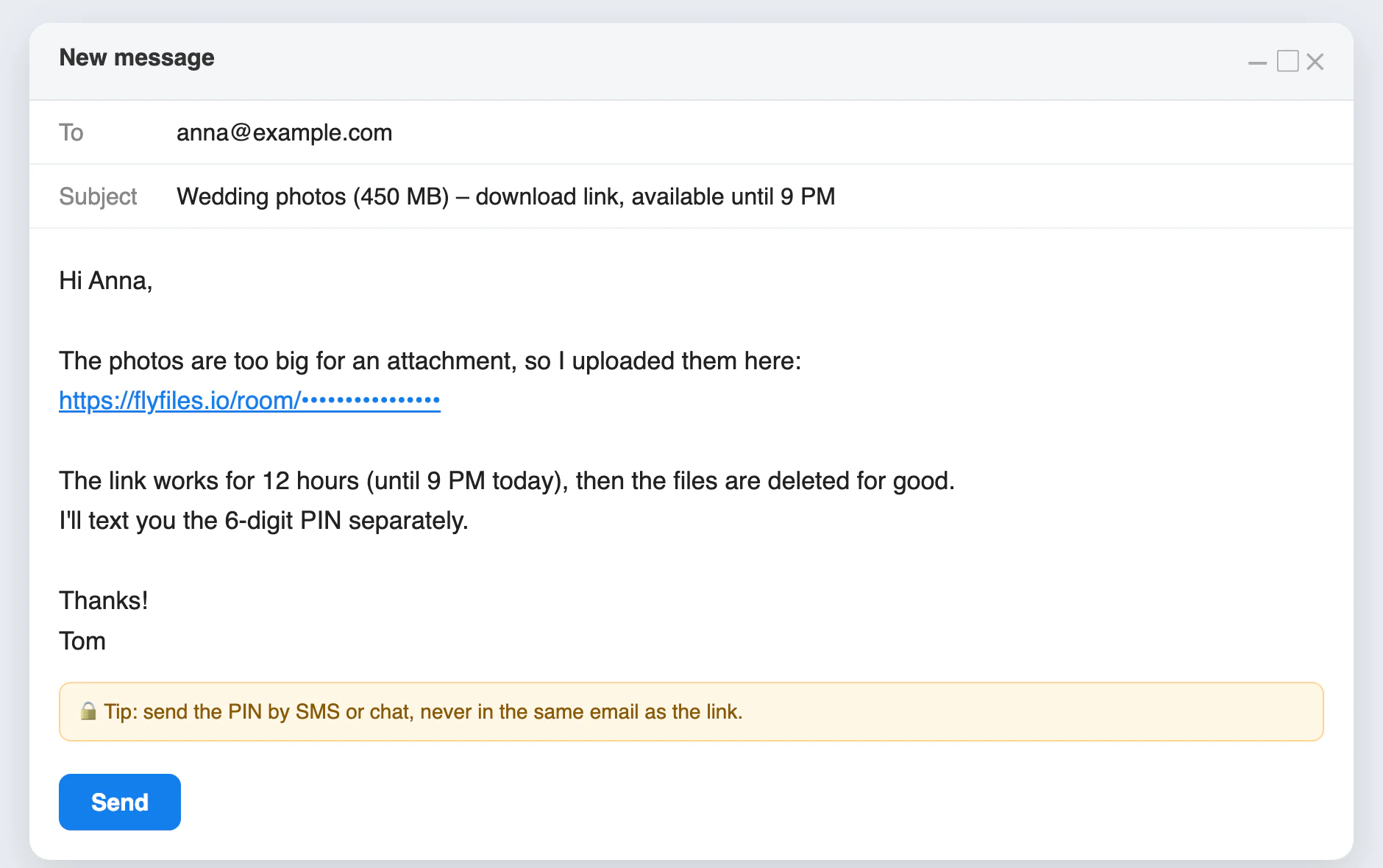
Example email:
Subject: Project files (320 MB) – download link, available until 9 PM
Hi Mark,
The files are too large to attach, so I've uploaded them here: https://flyfiles.io/room/…
The link works until 9 PM today; after that the files are deleted automatically. I'll text you the 6-digit PIN.
Best, Laura
#4. Delete when done
When the recipient confirms they have the files, go back to the room and delete them, or simply let the 12-hour timer do it.
#FlyFiles vs other ways to send big files
| Method | Free size limit | Account needed | Auto-delete |
|---|---|---|---|
| Email attachment | 20–50 MB | — | No |
| Google Drive / OneDrive link | Your free storage (15 GB / 5 GB) | Yes (sender) | No, you have to remember to delete |
| iCloud Mail Drop | 5 GB | Apple ID + Apple Mail | After 30 days |
| FlyFiles | 500 MB per room | No | After 12 hours, or on demand |
#Temporary file storage: frequently asked questions
#How can I send a file larger than 25 MB by email?
Upload the file to a file-sharing service and send the download link instead of an attachment. With FlyFiles you can share up to 500 MB for free without creating an account. The link works for 12 hours.
#What is the attachment size limit for Gmail, Outlook and Yahoo?
Gmail and Yahoo Mail allow 25 MB, and Outlook.com and Hotmail allow 20 MB per message. Because of email encoding, the real file size you can attach is about 25% smaller than these numbers.
#Is FlyFiles really free? Do I need an account?
Yes, it's free with no account needed. Each room holds up to 500 MB and 250 files for 12 hours. The recipient doesn't need an account either.
#What happens to my files after 12 hours?
They are permanently erased from the server, along with their file records. The link then shows that the room has expired. Deleted files can't be restored by you, the recipient or FlyFiles.
#Can I delete my files before the 12 hours are up?
Yes. Click the trash icon next to any file, or Delete all, and the files are removed immediately. The link stops working for those files straight away.
#How do I password-protect shared files?
Open the room's Settings and enter a 6-digit Room PIN. Anyone opening the link must then enter the PIN. Send the PIN separately from the link, for example by SMS.
#Is temporary file sharing safe?
It's safer than permanent sharing for one-off transfers. Each room link is long and random, files are deleted automatically, and you can add a PIN. For extra safety, delete files as soon as they're downloaded, and don't upload anything you don't have a copy of.
#Why did my email bounce even though the file was under the limit?
Either the encoded size went over the limit (attachments grow by about 33% when sent), or the recipient's mail server has a lower limit than yours. A download link avoids both problems.
#What is the attachment limit for iCloud, Proton Mail, GMX and Inbox.lt?
iCloud Mail allows 20 MB (or up to 5 GB with Mail Drop), Proton Mail 25 MB, mail.com 30 MB, and GMX and Inbox.lt/Inbox.lv 50 MB on free accounts.